 Feedback Bubble
Published 30 October 2026 · By Jonathan Jones
How to Group SaaS Feedback into Planned Product Changes
Group similar SaaS requests under one outcome-focused planned change while keeping every customer’s original message intact as evidence.
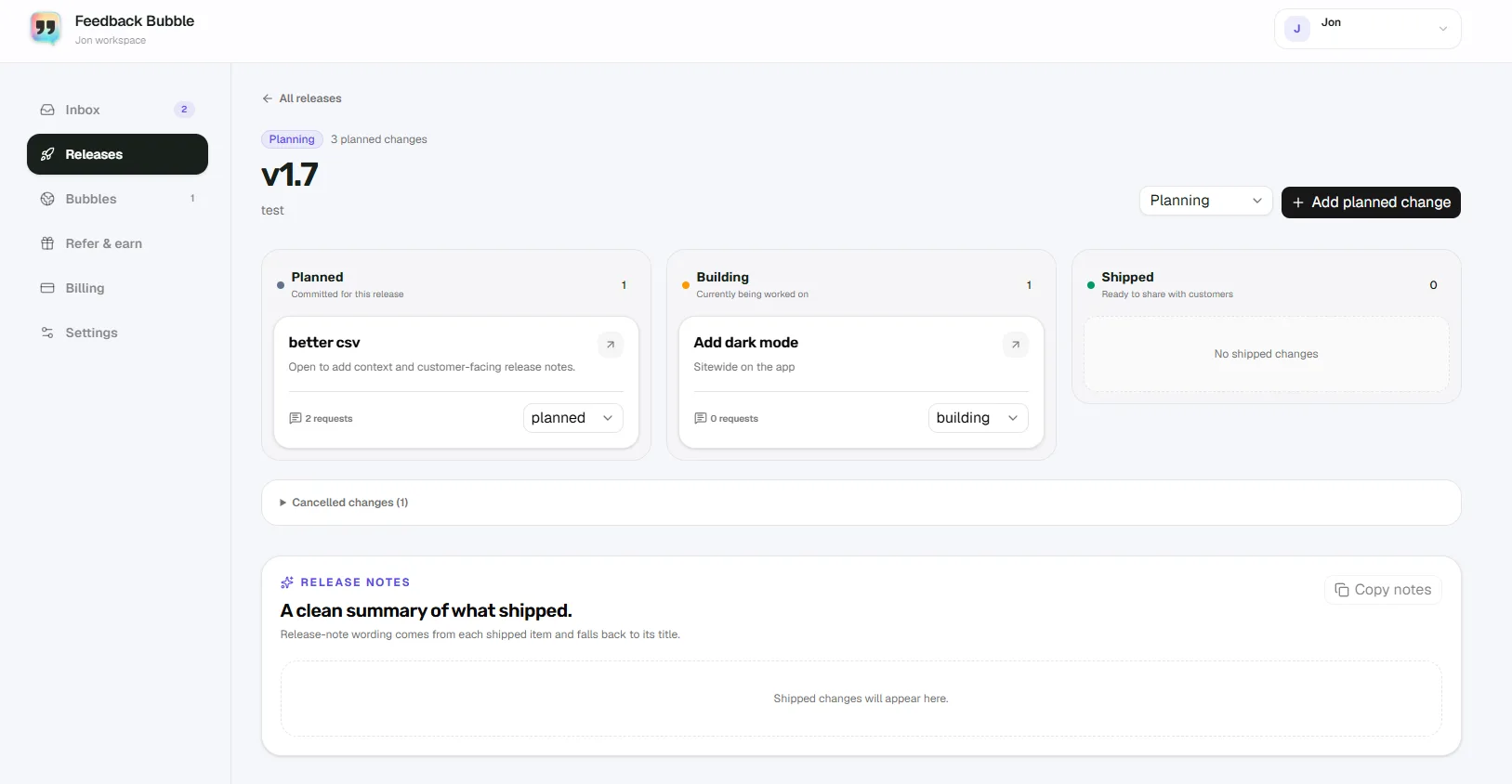
Group customer messages that point to the same underlying problem, create or choose a planned change named for the outcome you intend to deliver, and keep each original submission attached as evidence. This gives you one place to plan the work without rewriting what any customer actually said. The example below is illustrative, not a report of real customer feedback.
Separate the request from your product decision
A feature request describes what a customer thinks would help. A planned change records what you decide to do. Those may be related, but they are not the same thing. Keep the message in the customer’s own words, then give the planned work a short name that describes its intended outcome.
For example, a customer might ask for a download button, while another describes copying figures into a report by hand. If both messages point to the same need, you could group them under “Let users export reports as CSV”. The change name describes the work you are considering; it does not replace either message or prove that the change is committed.
A practical workflow for grouping related messages
Review the messages together. Look for a shared problem, task, or outcome, not just repeated words. Read the full messages and check their page context if it helps explain where the feedback came from.
Decide whether they belong together. Ask whether one planned change could reasonably address the underlying need behind each message. Similar wording is not enough if the customers are describing different situations.
Create or choose a planned change. Name it for the outcome your product work aims to deliver, rather than copying one customer’s request as the title.
Keep the original submissions attached. They preserve the details, differences, and wording that your summary cannot capture.
Track only work you have decided to pursue. Move the change through Planned, Building, and Shipped as its status actually changes. Feedback can inform a decision without every request becoming product work.
Worked example: different requests, one shared outcome
Imagine an indie analytics SaaS receives these three messages:
“Can I download this report as a spreadsheet?”
“I’m pasting the weekly numbers into a client update by hand.”
“It would help to get these results into our own reporting tool.”
These messages use different wording, but each may point to a need to reuse report data outside the product. If that is the problem you choose to address, you could attach all three to a planned change called “Let users export reports”. Keep the messages intact so you can see the distinct reasons behind the shared outcome. CSV might be one solution, but the feedback alone does not prove it is the right implementation.
When requests are too different to combine
Suppose another customer asks for automatic scheduled reports. That may involve a different need and a larger workflow than downloading a report manually. Keep it separate until you have reason to believe one planned change can address both. If you combine unrelated requests, the change title becomes vague and its attached evidence harder to interpret.
Grouping feedback in Feedback Bubble
In Feedback Bubble, review messages in Needs review or Saved. Select related submissions and choose Plan change. You can choose a release, create a planned change with an outcome-focused name, or add the messages to an existing related change. Each original message remains separate and attached to the work you chose to plan.
A planned change can move through Planned, Building, and Shipped, or be marked Cancelled if you decide not to proceed. This connection makes it easier to revisit the customer evidence as work develops. It does not automatically prioritise requests or mean every attached suggestion will be implemented.
For a broader process, see how to organise customer feedback or read about handling conflicting feature requests.
A short check before you group messages
Can one outcome reasonably address the need behind each message?
Have you kept the original submissions unchanged?
Does the change name describe intended work without implying a promise?
Are you treating the messages as evidence for a decision, rather than instructions to build every request?
Start by reviewing one cluster of related messages, then connect them to a planned change only if they support the same outcome. That gives you a useful record of both what customers said and what you chose to do about it.