 Feedback Bubble
Published 16 October 2026 · By Jonathan Jones
How to Measure Feedback Widget Performance Without Vanity Metrics
A practical way for indie SaaS founders to assess whether a feedback widget is helping: review submissions, context, decisions and shipped work without treating volume as proof of impact.
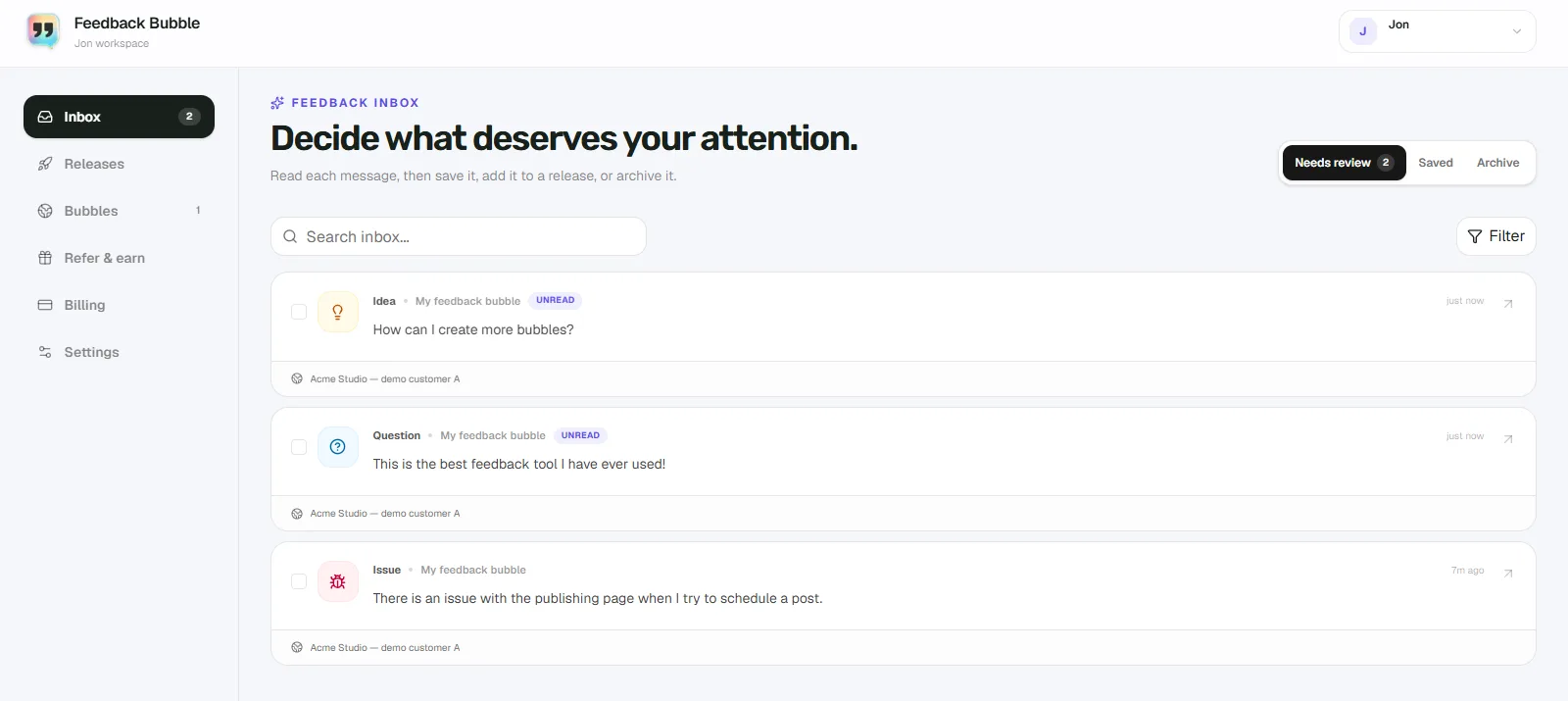
To tell whether a feedback widget is helping your SaaS, review a consistent period of submissions, look at which Issues, Ideas and Questions come from which pages, then trace useful messages to a decision or shipped change. Submission count is a starting point, not proof of product impact: a busy widget can collect plenty of messages without helping you make better product decisions.
A lightweight review can fit into your regular product routine. You do not need a complex score or a new analytics project. You do need to distinguish between activity, useful evidence and outcomes.
Start with a small, consistent review
Pick a regular review period, such as a week or a month, and use the same period each time. Note how many submissions arrived, then inspect the messages rather than judging the widget by the total. If your traffic or active user base changes, record that alongside the count. A raw total can rise simply because more people visited your site.
For each review, jot down:
The number of submissions and the period they cover.
How messages divide across Issue, Idea and Question.
Which pages or product areas they came from.
Which messages led to a decision, further investigation or planned work.
Which planned changes reached Shipped, and what you want to check after release.
This gives you more to work with than a lifetime submission total. It also keeps the review manageable for a solo developer or a small team.
Separate widget activity from product value
A widget can be active without producing useful evidence. Ask what each message helps you understand: does it point to a specific problem, reveal an unmet need, clarify a confusing part of the product, or give you a question worth investigating? A vague message may still be useful, but it might need context or a follow-up before you can act on it.
Then look for the next step. A message might be saved for later, archived because it needs no further attention, or connected to a planned product change. Some valuable feedback leads to a decision not to build the requested feature. That is still a decision, even though it does not appear as shipped work.
Track the path from message to outcome
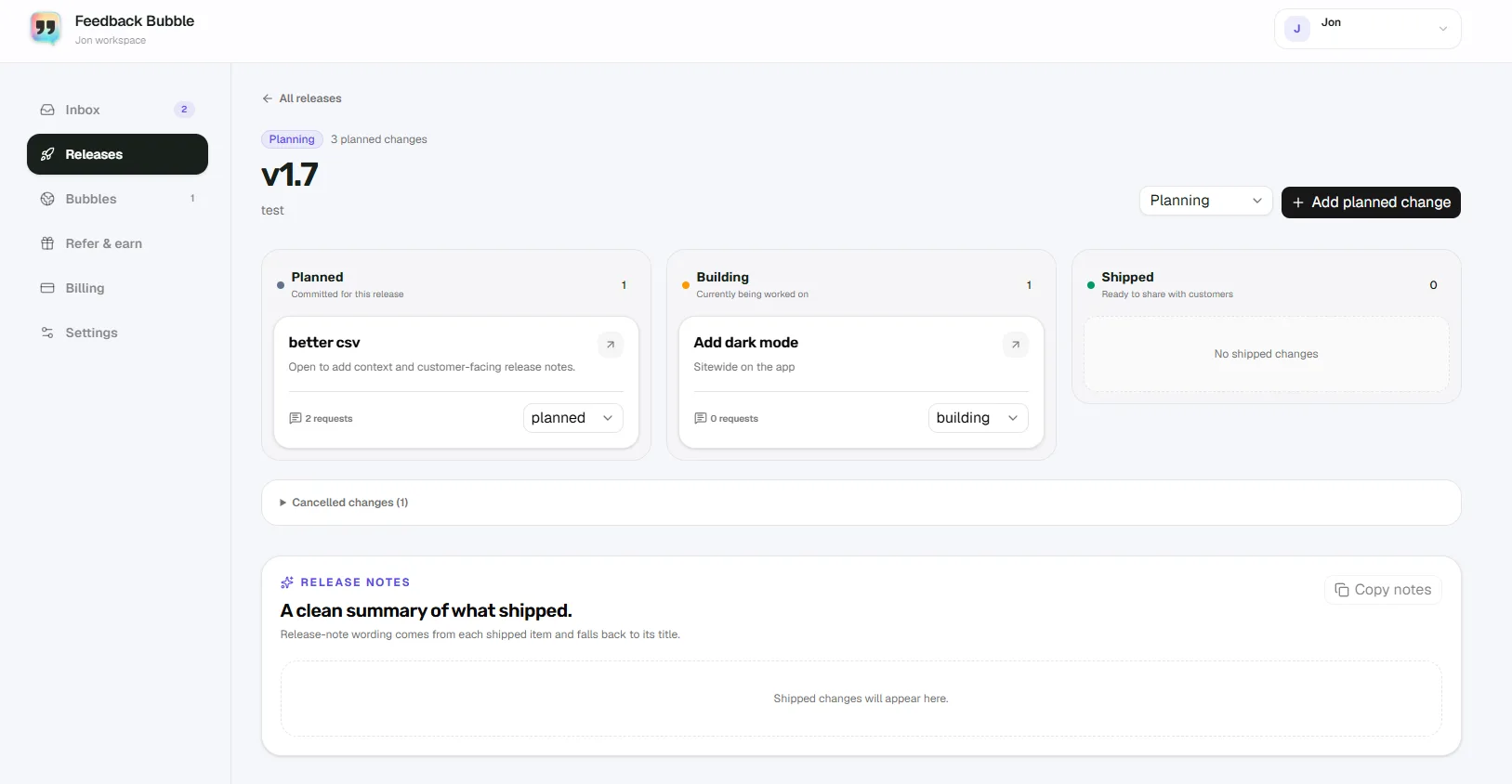
For feedback you choose to act on, note the original message, the decision you made and the change it informed. If related messages point to the same need, group them under one outcome-focused planned change. Track that change through Planned, Building and Shipped. Do not count every incoming request as a commitment to build.
After release, use a suitable way to check whether the change helped. Depending on the feature, that might mean reviewing product analytics you already use, speaking with the customers who raised the issue, or checking whether the same confusion continues to appear in feedback. A shipped change is evidence that you acted, not evidence by itself that the change improved the product.
Use page and device context to make messages easier to assess
A report tied to a particular settings page is easier to investigate than one with no indication of where the visitor was. Page and device details can help you decide what to check and may reduce basic follow-up questions. They do not explain the visitor’s intent or replace a clear description of what happened.
For example, a report that a billing option is confusing gives you a starting point. The page where it was sent can help locate the relevant screen, while the message still needs to explain what the visitor expected or found unclear. If that detail is missing, you may need to ask for clarification when a reply is possible.
Feedback Bubble attaches page details and, when available, browser, operating system, device and viewport context to submissions. It does not record sessions, keystrokes, screenshots or behavioural analytics. Treat this context as useful background for a message, not a measurement of what users did across your product.
A simple example of the review
Imagine a small reporting SaaS receives an Idea asking for CSV export. The founder checks the page context and reviews other messages to see whether they point to the same need. They decide to add export controls, connect the relevant feedback to a planned change, and track the work through Planned, Building and Shipped. After release, they check their chosen product measure and, if appropriate, ask the original visitor whether the change addressed their need.
This is an illustrative workflow, not a customer case study or a claim about measured results. The useful record is the link between the feedback, the decision and the follow-up check. If you publish a real example, anonymise it and verify the message and product outcome before describing it.
How to review widget performance in Feedback Bubble
In Feedback Bubble, submissions appear in Dashboard > Inbox > Needs review. Search or filter by Issue, Idea or Question, and narrow the view to a particular bubble when you manage more than one website. The inbox also shows the page title or path where feedback was submitted.
Move useful messages to Saved if you want to keep them in view without connecting them to planned work. Archive messages that no longer need attention. When you decide to act, select related messages and choose Plan change to connect them to an existing change or create a new one. In Releases, changes can be tracked as Planned, Building, Shipped or Cancelled.
For a practical walkthrough of connecting feedback to shipped work, read the SaaS feedback-to-release workflow.
Avoid these measurement traps
Treating more submissions as automatic proof of success. More messages could reflect greater exposure, a new issue or a change in how the widget is presented.
Comparing periods without noting changes in traffic, active users or product launches.
Counting every request as planned work. Feedback informs your judgement; it does not make the decision for you.
Using widget submissions to claim a feature caused better retention or conversion. You need suitable evidence for those outcomes, such as your own product measures or direct customer follow-up.
Expecting the widget to explain behaviour on its own. Feedback Bubble does not provide behavioural analytics or automatic prioritisation.
A useful review does not need a single performance score. Keep a short record of submissions, categories, pages, decisions and shipped changes, then use the same review routine to spot patterns. To see how the widget and inbox support that workflow, visit Feedback Bubble’s features.