 Feedback Bubble
Published 29 October 2026 · By Jonathan Jones
How to Turn Repeated SaaS Customer Questions Into Product Improvements
A practical workflow for spotting repeated customer confusion, deciding what to improve, and connecting useful questions to planned product work.

Questions Into Improvements
Turn customer questions into product improvements by looking for confusion that a change could prevent, checking that the proposed fix addresses the real need, and connecting the decision to planned product work. Keep the original messages as evidence, but do not treat every question as a task or every repeated request as a feature to build.
For an indie SaaS founder, questions can arrive through email, chat, contact forms, or a product feedback channel. The useful ones often reveal a gap in the product itself: a setting is hard to find, a label is unclear, or a step in onboarding leaves people unsure what to do next. Sorting those messages helps you distinguish a product improvement from a support reply.
Start by collecting questions with context
Ask customers to share the question close to the page or feature that prompted it. A message such as “Where do I change the sender name?” is more useful when you know it came from the email settings page. Page context can help you find the relevant part of the product, though it does not explain what the customer was trying to do.
A website feedback widget can give visitors a way to send an Issue, Idea, or Question without leaving the page. Feedback Bubble captures the page title, path, and URL with a submission, along with device and browser details when available. Those details can reduce basic follow-up questions, but a clear message from the customer still matters. Feedback Bubble collects and organises feedback; it is not live chat or a support ticketing system.
If you want to see how that focused approach works, visit Feedback Bubble.
Review questions alongside issues and ideas
Look at questions alongside bug reports and feature ideas. A question may point to a defect, unclear wording, or a missing capability. Read the message before deciding which it is. A customer asking how to export data, for example, might have missed an existing export option, or might need a format the product does not support.
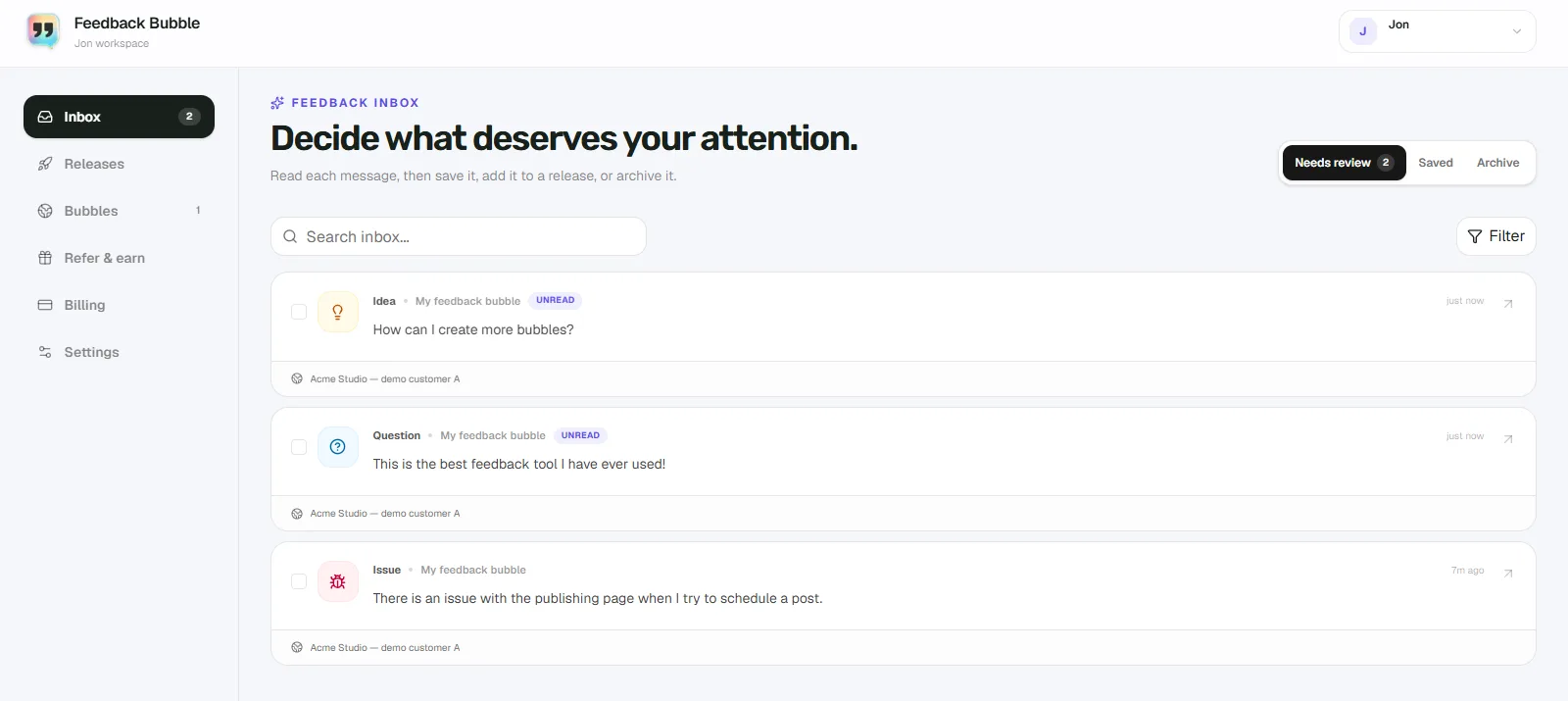
In Feedback Bubble, submissions appear in Dashboard > Inbox > Needs review. You can filter by Question, search messages, and check which page they came from. Keep useful messages in Saved while you gather more evidence. Archive messages that no longer need attention. These are inbox locations, not customer support statuses.
Look for a pattern, then check the cause
When similar questions appear, compare what customers are trying to accomplish, not only the words they use. Ask yourself:
Do the messages concern the same page, workflow, or decision?
Can you reproduce the confusion by following the same steps?
Is the answer already in the product, but difficult to find or understand?
Would a product change prevent the question, or is a clear support answer enough?
Do not assume that several similar questions prove a design is broken. Check the wording, the surrounding interface, and any relevant customer conversations. If the messages describe different needs, combining them into one feature request can hide important differences. For a related decision framework, see how to validate SaaS feature requests before building.
Example: clarify a confusing setting
The following example is hypothetical, not a report from a Feedback Bubble customer. Imagine a small scheduling app whose settings page has a control labelled “Offset”. A user asks what it changes. You inspect the interface and find that the control changes how far in advance a reminder is sent, but the label does not say so.
A proportionate improvement might be to rename it “Send reminder before event” and add a short example beside the control. That change addresses the likely source of confusion without adding a new feature. If the question also exposes missing behaviour, such as users needing a different reminder schedule, investigate that separately before planning additional options.
Connect a justified change to planned work
When you decide a product change is warranted, name it by the outcome you intend to deliver. “Clarify reminder timing” is more useful as planned work than copying a customer's question as the task title. Keep the original message attached so you can revisit the evidence and understand the decision later.
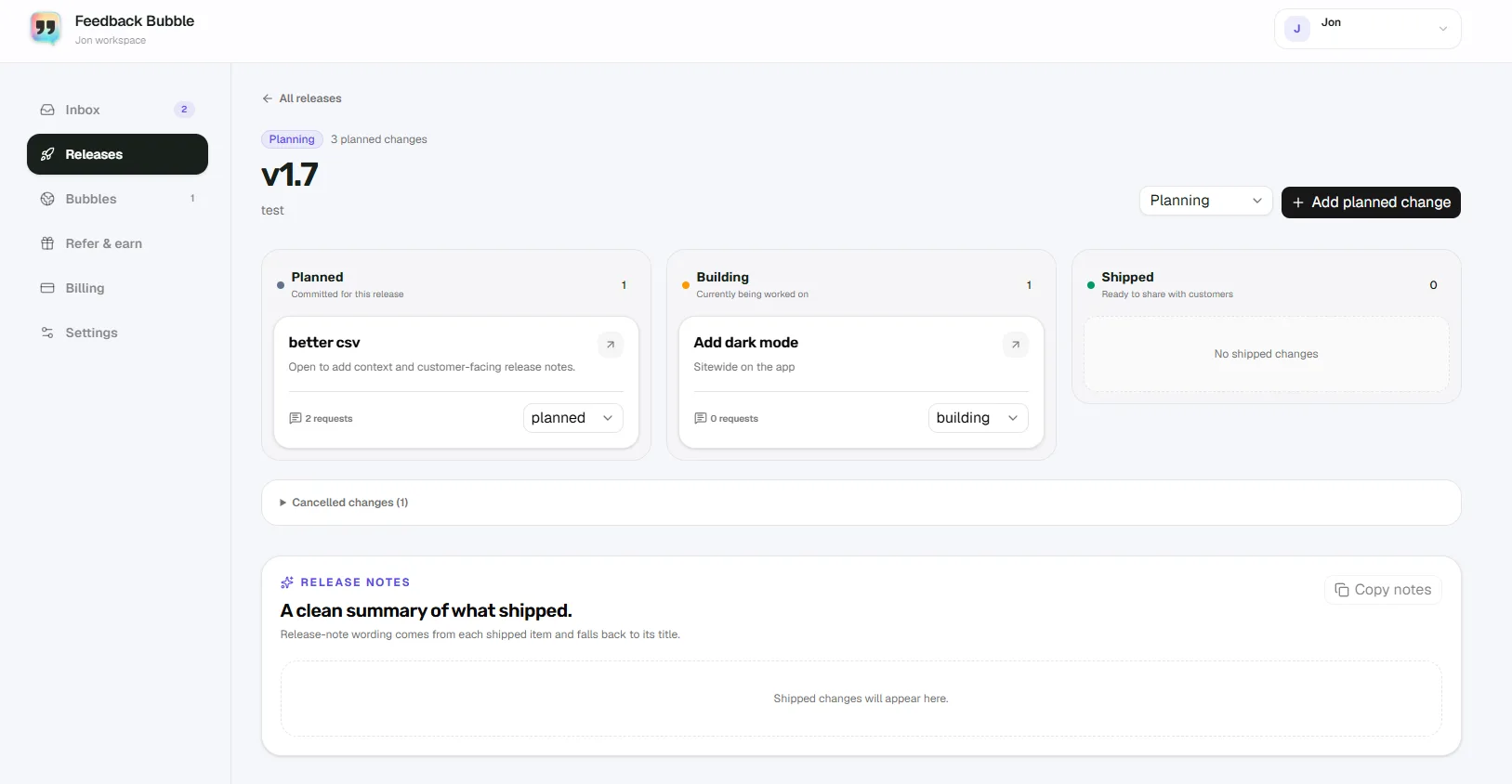
In Feedback Bubble, select related messages in Needs review or Saved and choose Plan change to connect them to planned work in a release. Planned changes move through Planned, Building, and Shipped. Several messages can support one change, but you still choose whether to act, what to build, and when. A useful question may lead to a wording edit, a documentation change, a support reply, or no product work at all.
Keep the workflow useful, not automatic
Do not build a feature solely because someone asked a question. Find out what they need to accomplish.
Do not confuse a repeated question with proof of a widespread problem. Treat it as a reason to investigate.
Do not leave the original wording behind when you plan a change. The message preserves what the customer actually said.
Do not expect a feedback inbox to replace live support. If someone needs an immediate answer, use a support channel suited to that need.
A simple routine is enough to start: review new questions, save the ones worth investigating, check for a shared cause, then connect a justified improvement to planned work. The inbox helps you keep the evidence together; your judgement determines what changes.
If customer questions are scattered across your website and inbox, see how Feedback Bubble collects and organises on-page feedback.