 Feedback Bubble
Published 18 October 2026 · By Jonathan Jones
A Weekly SaaS Feedback Review Routine for Solo Founders
A simple weekly routine for reviewing SaaS feedback, deciding what to save or plan, and clearing items that need no action.

Review Feedback Weekly
Set aside one short, recurring slot each week: scan new feedback, use the page and device details to understand the report, save anything worth revisiting, choose whether any theme merits planned work, and archive items that need no action. The aim is a clear next step for each message, not a promise to build every request.
A weekly routine that fits around building
Pick a regular time that suits your working week. You might start with 20 minutes and adjust if the inbox is larger or a report needs investigation. Avoid treating each notification as a reason to stop coding. A scheduled review gives feedback a place in your week without letting it dictate the day.
Open Needs review and scan the new messages. Search or filter by feedback type or website if that helps you focus. Start by asking what the visitor experienced, rather than whether you already want to build their suggestion.
Check the context. The page title, path and available browser or device details can help you interpret a bug report or understand where a question arose. They can reduce follow-up questions, but they cannot explain what the visitor meant if their message is unclear.
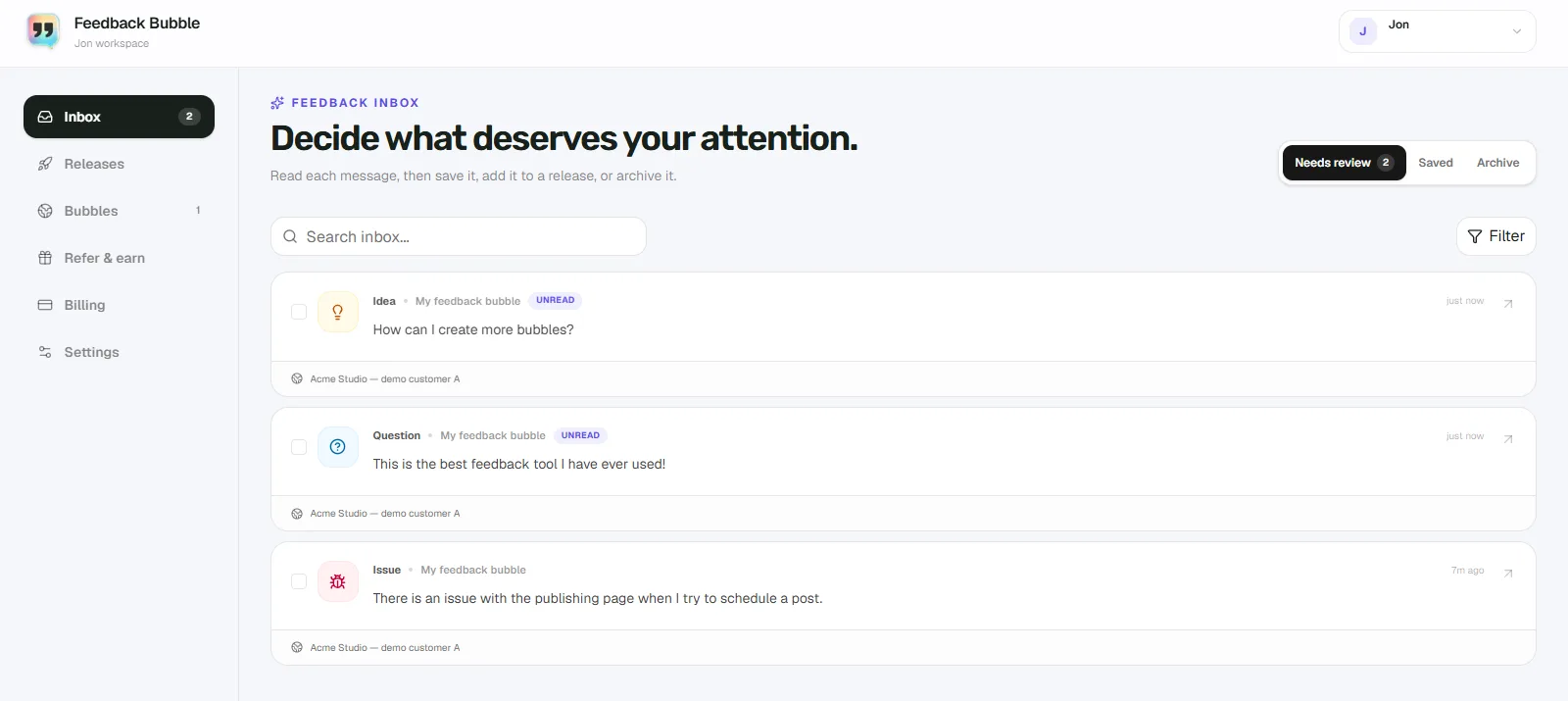
Choose the next step. Keep useful feedback in Saved if you want to revisit it but are not ready to plan work. If a message needs no action, move it to Archive. If several messages point to a problem you have decided to address, connect them to one planned change.
Finish with a short note for yourself: what you decided, what needs more investigation, and what you might review next week. This keeps your reasoning visible without turning the feedback review into a second product backlog.
Make a decision without overthinking every message
For each item, consider three practical questions: Is the problem clear? Does it affect a product goal or a task users need to complete? Do you have enough evidence to act, or should you learn more first? A single report can reveal a genuine issue, but it does not automatically establish how common it is or what the best fix would be.
Use your judgement alongside the messages. A request may conflict with your product direction, solve a problem only one customer has, or need more investigation. You can preserve it in Saved while you look for more evidence, or archive it if you have decided it is not relevant. Neither choice changes the customer’s original wording.
Example: a confusing billing choice
Hypothetical example: a visitor sends a Question saying they cannot tell whether the annual plan price is billed monthly or once a year. During the weekly review, you check the page path and read the message. It is clear enough to understand, but one report alone does not tell you how many other visitors are confused.
Save the message if you want to compare it with later feedback. If similar messages arrive and you decide clearer billing wording would help, select the related feedback and connect it to a planned change, such as “Clarify annual billing on pricing page”. The messages remain separate evidence for one outcome. If the wording is already clear after review and you decide no change is needed, archive the message instead.
Keep the inbox and planned work separate
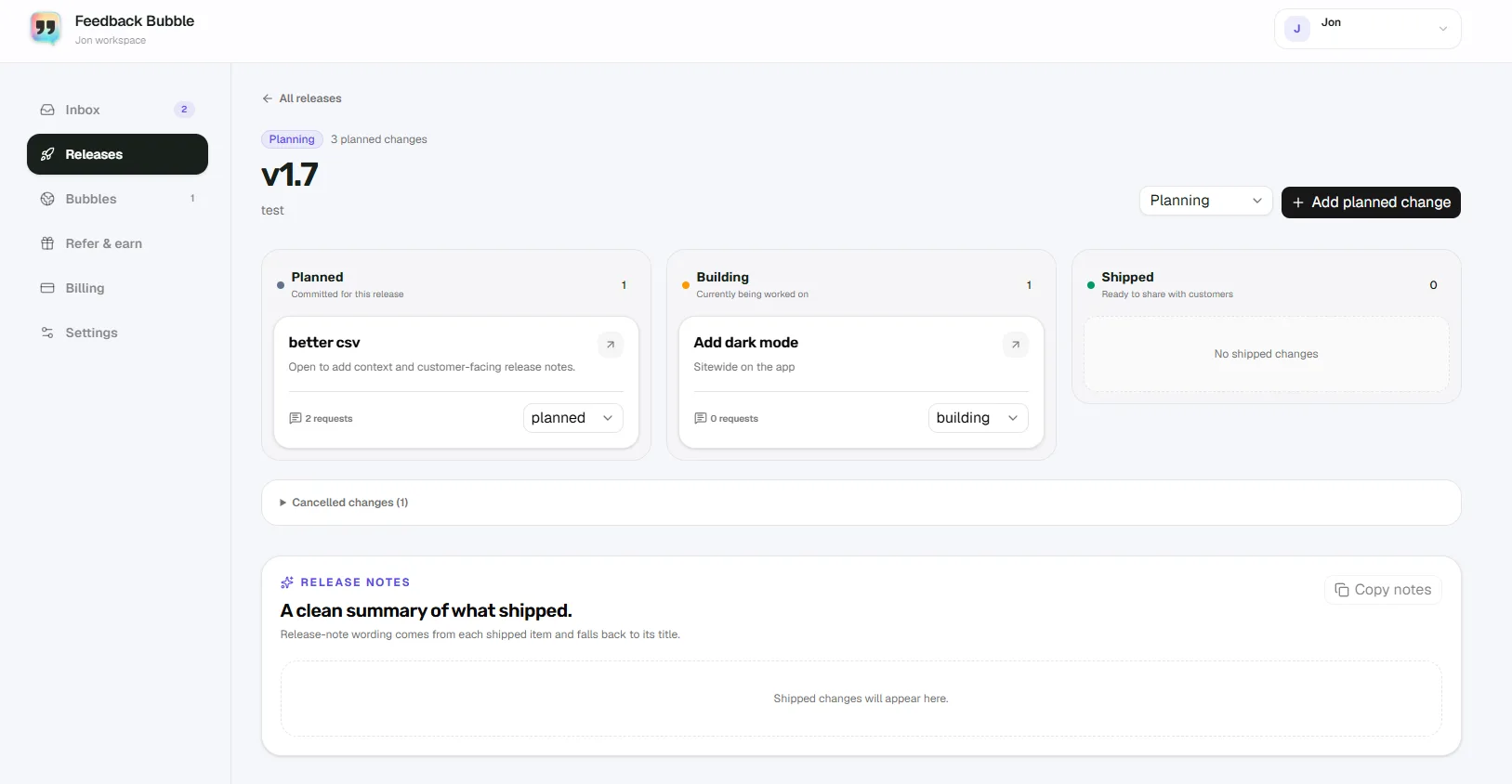
Needs review, Saved and Archive are places to organise feedback. A planned change is a decision about product work. Keeping those ideas separate helps you avoid treating every message as a commitment. When you do decide to act, track the change as Planned, Building and Shipped as its status changes. Mark it Shipped only when the improvement is available to the customers it concerns.
A recurring review can also show you what remains uncertain. If a report lacks enough detail, keep it for follow-up or ask a focused question when you can. Page and device context is useful evidence, but Feedback Bubble does not provide session recordings or screenshots that show exactly what happened on the visitor’s screen.
How Feedback Bubble supports the routine
Feedback Bubble brings website feedback into one inbox. In Dashboard > Inbox, you can review Needs review, keep useful messages in Saved, and move items that need no further attention to Archive. Each message can include the page where it was submitted and available browser or device context. When related messages deserve product work, select them and choose Plan change to attach them to an existing change or create a new one. These current labels and workflows are shown in the product’s overview.
The inbox screenshot shows the review view; the release screenshot shows how planned work is organised separately.
Once a change is ready, update its status to Shipped. You can add customer-facing release-note wording for the change, then copy the resulting notes. Feedback Bubble does not automatically publish a public changelog. For the full planning and release-note workflow, see SaaS feedback to release notes.
Keep the habit useful, not elaborate
Do not create a scoring system unless it helps you make a real decision.
Do not move every idea into planned work. Keep uncertain items in Saved while you gather more evidence.
Do not leave reviewed messages in Needs review just because you have not chosen to build them.
If the inbox is quiet, finish early. A weekly routine is a regular check, not a target to fill a block of time.
Start with one recurring review slot and give every new message a clear next step: save, plan, archive, or investigate further.